AI Meeting Intelligence - AI Meeting Notes That Know Your Business
The notes your meeting tool writes are the same for every company. They only get useful when they know your goals, your customers and your business language.
This started with a customer. They wanted more out of their meetings than a recording nobody watched and notes nobody opened, and they had tried the tools built into their meeting software. Those tools are built to be generic. They serve every company and every kind of meeting with one product, so they cannot know your goals, your customers or your vocabulary, and what comes back is the same long report for every meeting. What the customer wanted was different. They wanted the decisions and follow-ups while the meeting was still on, checked against what the meeting was supposed to achieve, and delivered into the systems they already use. We built this prototype for them because we had built the same pieces in other projects and knew it would take days, and because we had seen how much value there is once it is tailored for a specific company's need.
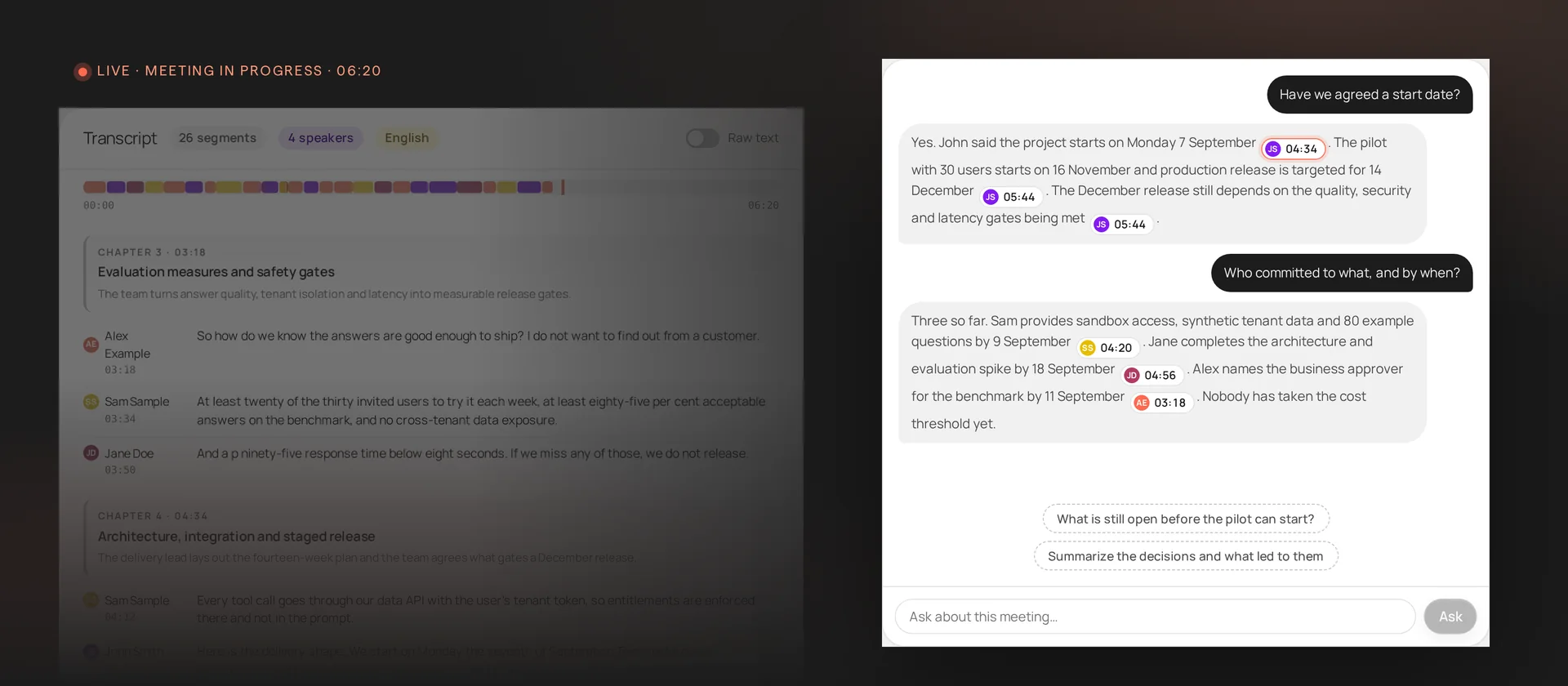
This is what the prototype looks like during a live meeting: the audio source and meeting goals on the left, the transcript filling in as people speak, and a chat on the right where you can ask the meeting a question.
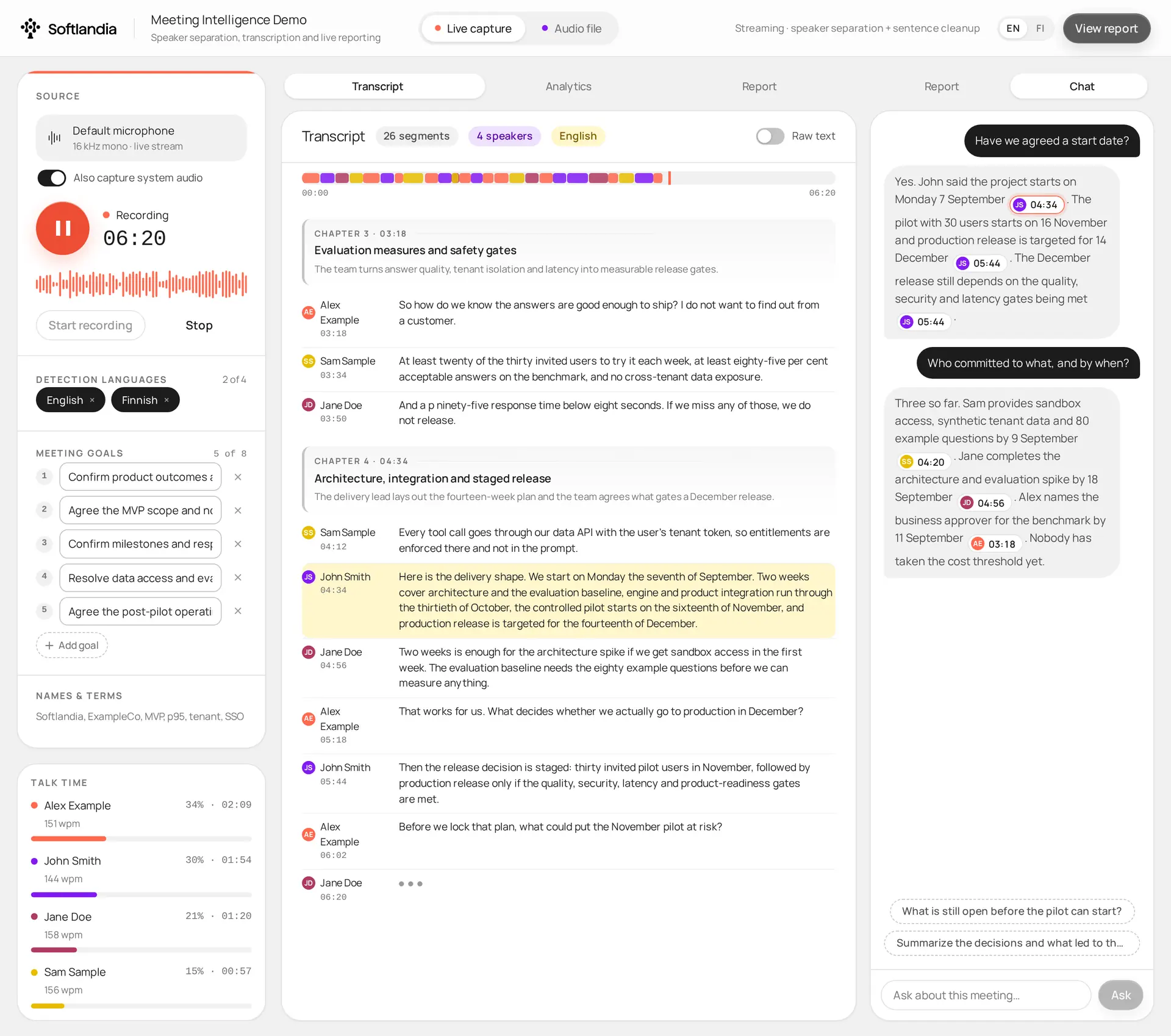
The transcript fills in as people speak, and a question typed into the chat is answered with chips that show who said it and when.
Watch the prototype in action
The video below walks through the whole prototype.
Why the built-in meeting notes are not enough
The built-in tools have improved. Teams and Google Meet write notes with a summary, decisions and next steps, and the newest versions can follow an agenda while the meeting is running. In our experience the email with the recording and the transcript still goes unopened. The reason is not the quality of the AI. These services can't just be tailored enough, so they know the words of the meeting and nothing about the context. Every meeting gets the same kind of report, and the report is long because the tool cannot know what to leave out.
A layer built for one specific company starts from the other end. Before the meeting you tell it what the meeting is for: the goals, the people, the companies and the terms it should recognise. During the meeting it grades those goals against what is being said, so when the budget owner has not come up yet you see it while there is still time to ask, and you can check what someone said ten minutes ago without interrupting. What it hands back is short, because it only keeps what your team has said it cares about, and it can be written straight into the systems your team already uses. And nothing is detached from the source. Every decision and every answer keeps its place in the recording, so you can jump there and read what was said, or listen to it.
The same meeting. Left, the generic notes a meeting tool generates. Right, the prototype during the meeting: it knows the goals and names you gave it beforehand, keeps only what matters, and every item links back to the recording.
From live audio to answers, step by step
The picture below is the whole idea in five steps. A speech-to-text service turns the live audio into phrases and tells us who spoke and when. A language model cleans those phrases into readable sentences a few seconds behind the speaker, and picks up people's names from their introductions. Then it reads the conversation so far, roughly every ten seconds, and turns it into decisions, action items, open questions and a verdict for each goal. When you ask a question in the chat, the answer is built from the same material.
The important design choice is that the speaker and the timestamp stay attached to every sentence through all of these steps. That is what makes the chips possible: every decision, action item, goal verdict and chat answer carries a speaker and a time, and clicking it scrolls the transcript to the sentence behind it. The models do the interpreting, and you always have a two-second way to look at the original words. We would not build a summary feature without this anymore.
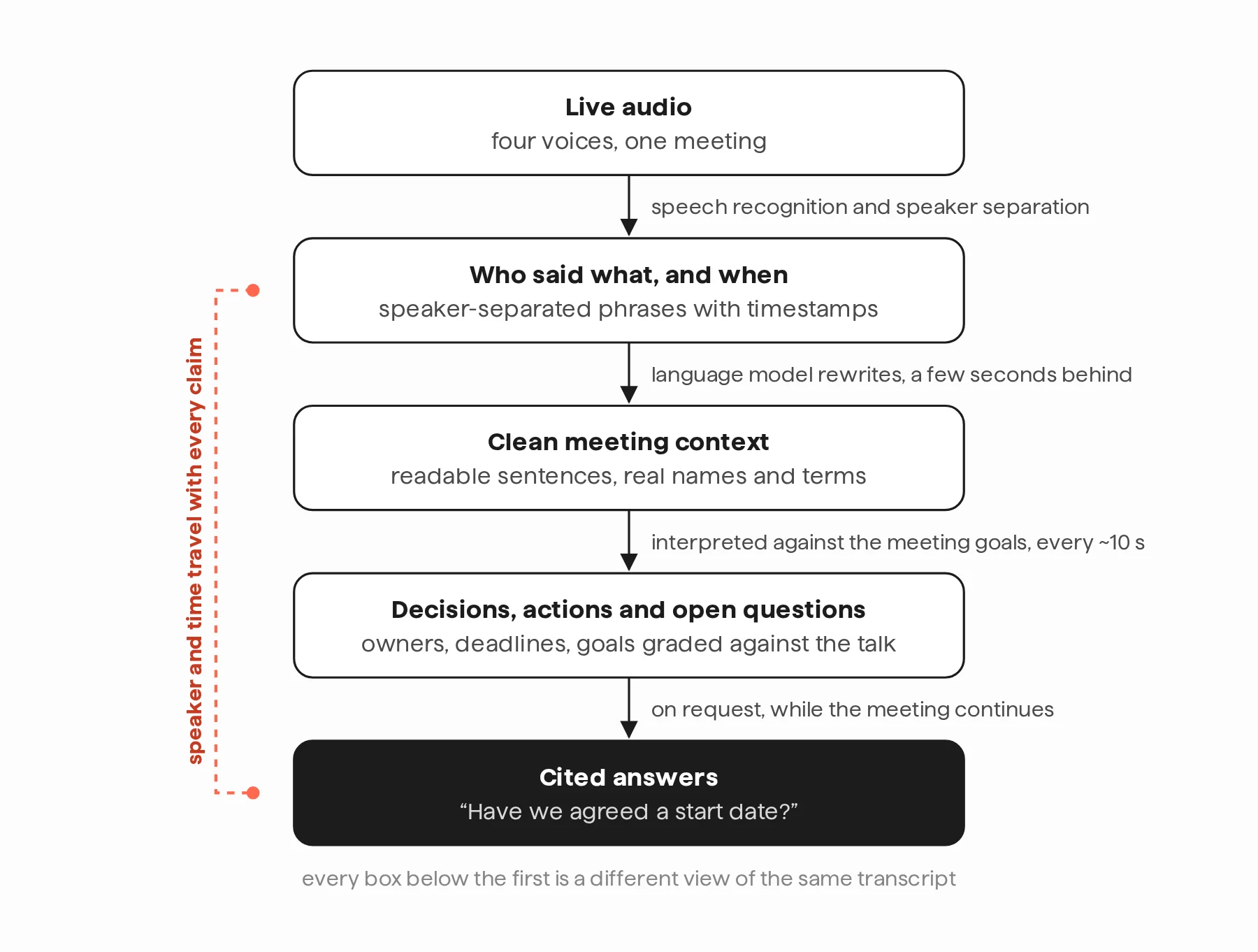
The steps between the microphone and an answer. Speaker and time stay attached the whole way down, so anything the system says can be traced back to who said it and when.
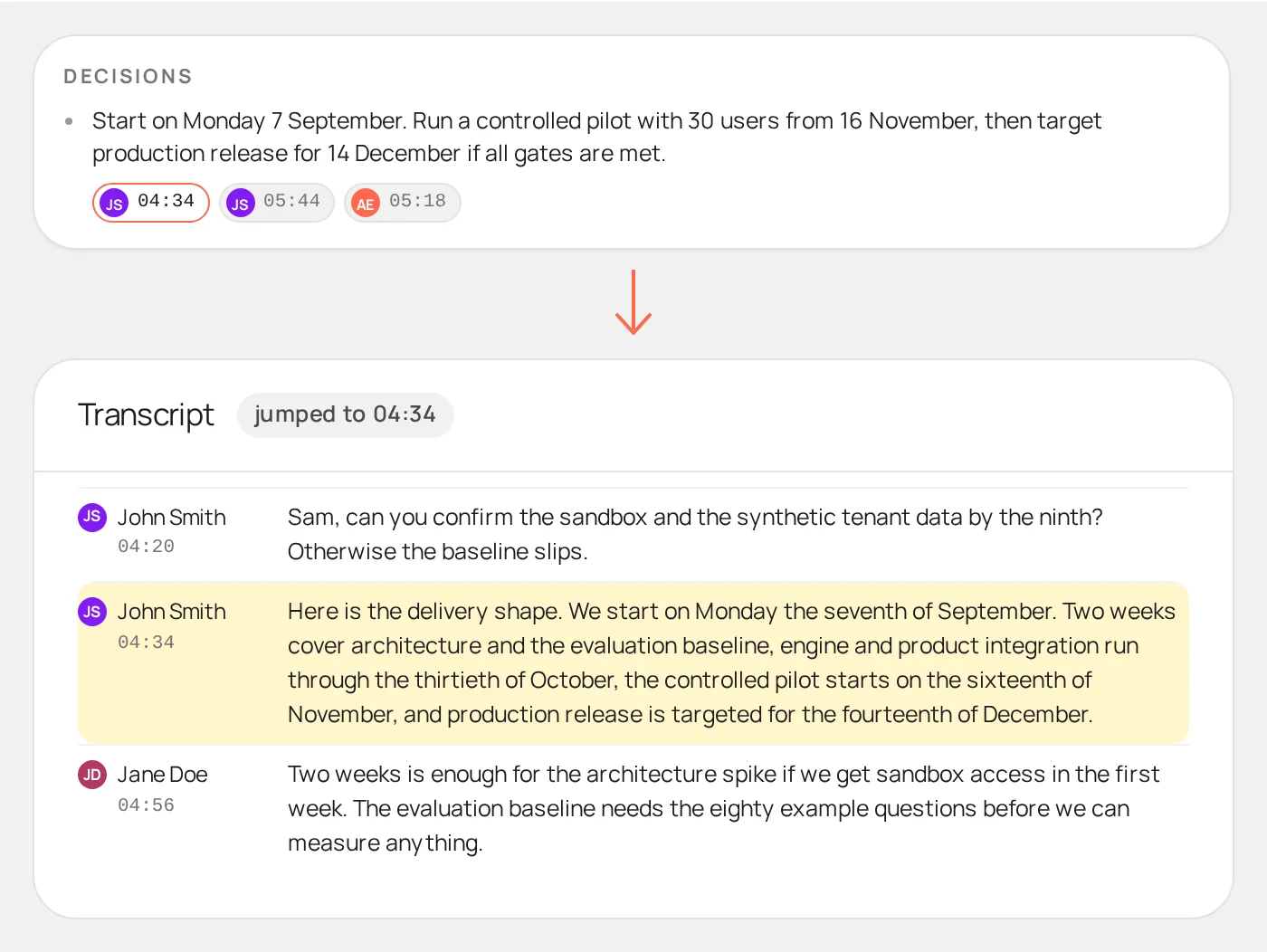
One generated conclusion, its evidence chip and the transcript row it points to.
Tell it what the meeting is for
Before the meeting, the organiser writes down what it should achieve, along with the names and terms the system should know. During the meeting the goals show up as a scorecard, graded against what has been said so far. The useful row is the one that stays grey: a topic that never came up, marked as not discussed while there is still time to raise it. A summary can only tell you what was said. This also tells you what was not.
The goals are also how the analysis fits the meeting. A sales call, a project kickoff and a customer interview have different definitions of a good outcome. The pipeline is the same, only the goals change, and the output starts to feel like it was made for that meeting.
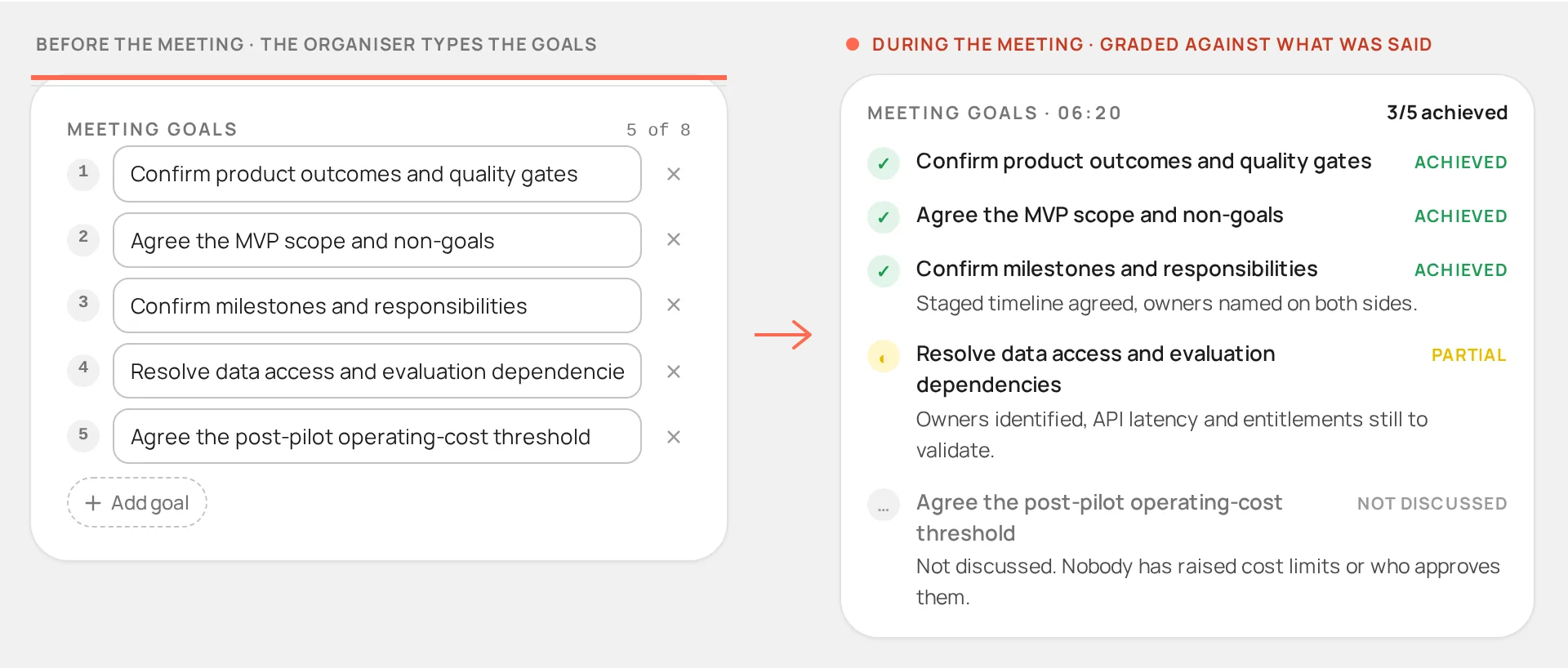
The organiser's goals before the meeting, and the same goals graded six minutes in.
How it is built
There is no single model doing all of this, and the choice of vendor matters less than people think. Every big cloud provider offers the same building blocks. A speech-to-text service handles the live audio. For uploaded recordings the prototype runs two transcriptions in parallel, one strong on speakers and one strong on wording, and merges them. A large language model does everything that requires understanding, and it only ever sees the transcript. Everything reads from and writes to one canonical transcript, so the report, the chat, the scorecard and the analytics are different views of the same data.
That last part is what makes it easy to integrate. The prototype has its own UI because a prototype needs one, but the decisions and action items can just as well be written into a CRM, a project tool, or to Teams or Slack. There are some SaaS products that do parts of this too, but they come with a monthly subscription per user. If you build on frontier speech and language models directly, you pay for what you use, and a quiet month costs nothing. Building it is normal software work. The prototype took days, and a version wired into an existing system is also matter of days.
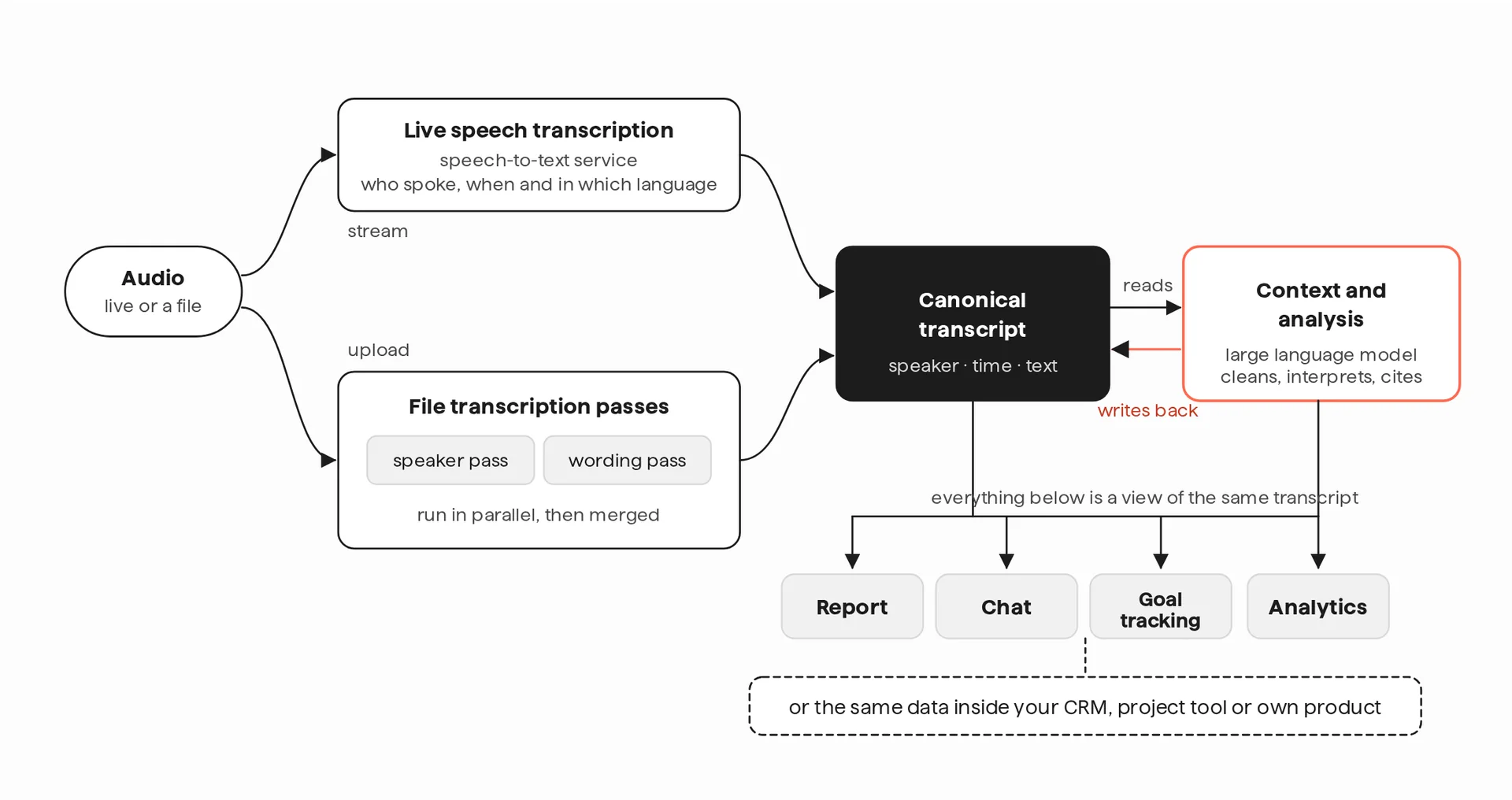
Specialised services and multiple AI models, one shared transcript. Speech models decide who said what and when, a language model decides what it means, and every view reads the same data.
Speech-to-text was only the beginning
Turning speech into text is a commodity now, and the generic notes on top of it are becoming one too. The value is in what you do with the text for one particular business, and that is where a general-purpose product stops and a tailored layer starts. The same way of thinking fits far beyond our prototype. Sales calls where the commitments, objections and next steps land in the CRM before the call has ended. Steering meetings that keep their own decision log, with an owner and a source for every entry. Customer service calls that turn into tickets with the right fields filled in. Field work where a technician talks while their hands are busy and the inspection report writes itself. Or a live meeting coach on the meeting-room screen that follows the conversation and reminds you which goals have not been touched yet, which questions nobody has asked, and when the meeting is drifting. Once the conversation is structured context, the list goes on for as long as you want it to.
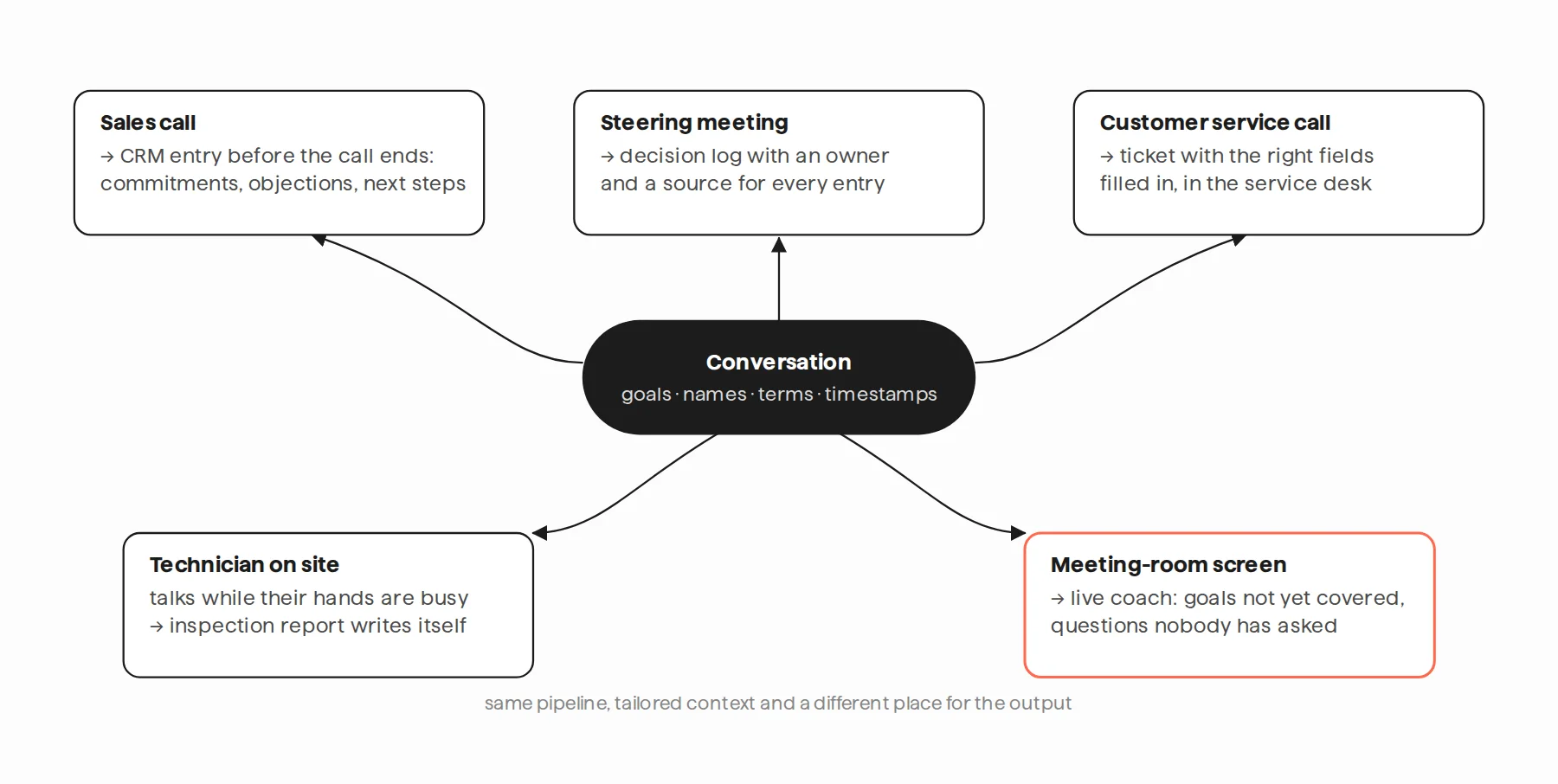
AI models are generic, so are the meeting transcriptors. The real benefit comes from the context and the flows that each company has their own unique way of handling them. Speech is now just another input for software, and what you build on top of it is where the value is.
If you are dealing with a similar problem, or with AI more generally, we are happy to talk.
Atte Tuomisto

Atte Tuomisto
Senior Software Architect